High quality tunes in a real simple interface.In my quest for the best site to download songs from, I've come across songza, seeqpod, skreemr, Pandora, and imeem. Yet none meet my standards quite as well as Playlist. The setup is so user friendly with all the important stuff highlighted so there's a clear flow to each page. The selection of music is impressive not only including what I'd normally find on a CD but remixes as well. Only imeem can compete with that. Similar to songza and seeqpod, making my own playlist just requires a search and click to add. If I'm feeling a bit lazy to build my own library of songs, I can listen to another member's playlist. The best part about Playlist is that all the music is in mp3 or mpeg format so they can all be downloaded with DownloadHelper for Firefox and I never have to do any flv conversions. Although I'll still go on imeem for unique music, seeqpod for discovering new tunes, Pandora for interesting variety, and skreemr for superior quality audio, Playlist has become my new default for song searches.
 Tunatic identifies the song you're listening to.I'm sure you know what it feels like to listen to a song and say, "what's the name of that song?" It can be seriously frustrating right? You might hear it on the television in a commercial or listen to it on the radio all the time or you just have a really bad labeling system for your music folder. You then try to catch bits and pieces of the lyrics but some times they're so hard to make out clearly. You ask your friends who act as if they've never heard anything in their whole lives and just give you the feeling that you're the only one who hears it. Worry no more! Tunatic from Wildbits is "hear" to help. No, it's not a lyrics search engine, it's a handy software that listens to the song and finds it for you. Here's how it works: if you have a microphone for your computer just wait for that song to play on the TV or radio, put the microphone up to the speaker, and click the magnifying glass on Tunatic to identify the song. If you don't have a microphone, Tunatic can also tell you what song you're listening to from your computer speakers, perfect for online radio. I tested it out and identifying with the speakers was really accurate. You really have to turn up the volume for the microphone but it still works fine. Give it a try, you'll be amazed on what songs it knows.
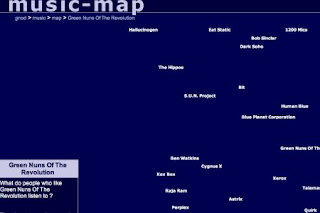 Discover new artists similar to those you like.Not filling up your music player's hard drive? Well you better find more music you like if you ever want to optimize those 30 gigabytes of space. With music-map you can put in an artist and it'll show you a no-frills map of artists similar to the one you entered. It's a fast and simple way to find new artists that you might enjoy. But what if you wanted to find an artist that's like multiple artists you already like? You should try gnoosic. It's a really unique way to find new artists because you're not just searching for someone similar to one artist, but a combination of three different ones. The larger the differences between each artist you enter, the more interesting the outcome becomes. Now go on and add more songs to your little library already.
 Download music and videos from a website with one simple firefox add-on.It really couldn't be any easier with DownloadHelper. A song or video is just a few clicks away from being stored on your hard drive. You can go to nearly any site like imeem, youtube, aol, DivxTube, etc. and be able to download pretty much anything they offer. With the internet browser firefox, install the add-on, and when you see or hear something you like look at the DownloadHelper symbol that should be to the right of the address bar. If it's gray then you're not able to download it, but if it's in color and moving then you're in luck. Click the down arrow that shows up when you hover your mouse over the spinning symbol to see what's available. Now even though it may have a bizarre name, the file you want is most likely there. If you select one of the options and the download is done immediately you probably have a dud. Try another selection until you get a fairly large file depending on what file you're downloading. After it's complete, you need a player that recognizes .flv files. I recommend Media Player Classic that's included in a very useful codec pack called k-lite. You can also convert .flv files into something else with SUPER. So now you can go nuts by clicking on the DownloadHelper symbol at any time and looking at the list of sites that you can download media from with you're new add-on.
 Download music easily with Skreemr on Songbird.
This is the easiest way to get free and legal (to the best of my knowledge) music with just a website and single program. The program is Songbird which is free to download and it's a lot like iTunes where you can create and organize music and videos from your library into playlists, but Songbird has a built in web browser. And the coolest thing about this web browser is that whenever it detects a song file on a website that you're looking at it displays it in a temporary playlist at the bottom where you can play and download the song. So now all you need is a website like Skreemr to search for music that you want and use the built-in download feature on Songbird to get songs onto your computer. You can also use music search engines like mp3000, MP3Salad, e-mp3s, and KOhit to find songs too. That's it! But remember to only download legally.
 Feel refreshed after listening to soothing music in just 20 minutes.
If you take naps a lot like me, but hate it when you end up sleeping for hours just to wake up feeling tired again then 20MinuteNap has a free and simple solution: take a 20 minute nap of course. Just close your eyes and enjoy soft music so that after about 20 minutes of relaxation, you're ready to get back to work without feeling exhausted. The music isn't some boring classical stuff either, they're actual songs from bands like Snow Patrol, Jack Johnson, and Coldplay. You'll be surprised that this system actually works and it's just as effective as a 2 hour snooze but without the afterward sleepiness. Try it next time you feel like collapsing onto your bed to stay unconscious for a few hours.
 The feature-rich Archos mp3/video players easily beat any iPod.
I'm going to discuss the absolutely amazing Archos 604 WiFi. The screen is as big as the PSP's (about 4" diagonal) but it's also a touch screen for easy navigation. It has a respectable 30Gb hard drive to store everything from music to videos to photos and more. You can customize practically everything, such as the background with one of your own photos. The removable battery lasts for about 15 hours playing music while video watching will give you 5 solid hours. There's an external speaker for listening without the headphones, a built-in microphone for recording audio on the go, and there's a kick stand in the back to prop up the player when watching videos. With a separate dock, you can even record tv shows just like a DVR. And because it's WiFi, you can even access the internet for free to check email, write on forums, and check your blog. In fact, I did this entire post on my Archos (save for a bit of adjustments later on). The only draw backs are the price (upwards of $300) and you can only watch online videos from sites like youtube.com on the 605 model which costs a bit more. Does an iPod have all that? Didn't think so.
 High quality tunes in a real simple interface.